Polaris OS · HQ, Work and Chat in one shell
The operating system for a company of people and AI workers.
Assign work to either. A Chief of Staff picks the owner, every request you make is kept word for word until a delivery answers it, and only a person closes the task.
Download for Mac, iPhone and Android →Open models first, on your own RunPod · Claude where a task needs it · cost logged per model call · $0 for the software
One shell
Three tools. People and workers in all of them.
An AI worker shows up in the same owner picker, the same channel member list and the same Today as a colleague. It feels like working with a person. The difference is that it picks up at 3 a.m., reads the whole thread before it answers, and never forgets an instruction you wrote down once.
HQ
Where you run the company.
- ✦Today: what needs you, nothing else
- ✦Pulse, Portfolio, Map and Goals
- ✦People, Workers and their Mind files
- ✦Desks and Models, with cost per call
Work
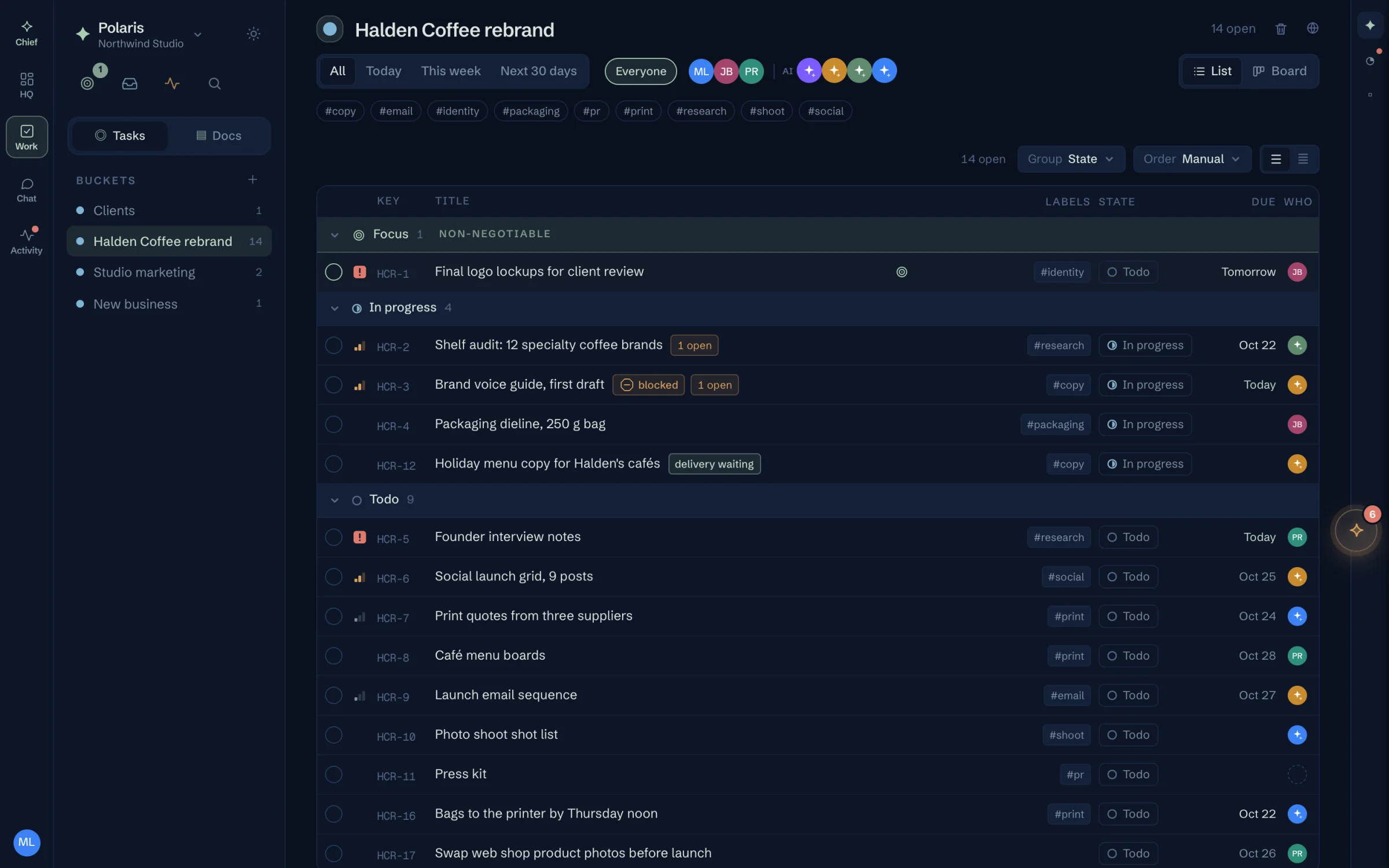
Where the work lives.
- ✦Focus, Inbox and every project
- ✦A full-width list grouped by state, keys, labels, blockers
- ✦Docs, where a selected line becomes a task
- ✦Properties, activity and history on every task
Chat
Where the team talks.
- ✦#general, a channel per project, DMs, threads
- ✦Workers are members and answer when @mentioned
- ✦/task turns a message into owned work
- ✦Task, proposal and delivery cards inline
Ask once. It gets routed, done, checked and closed.
Every comment you leave on a task is written into a ledger, word for word. A worker can only deliver by answering each open request, a critic with a clean context checks that it did, and a person closes the task. If the work stalls twice, it stops and asks the person who decides.
You ask
in a task, in chat or in a doc
Request ledger
your words, kept verbatim
Chief of Staff
✦ AI AutoAssign picks the owner
Worker
works from its Mind files and tools
Critic
checks every request was answered
You close
accept, or send it back
↺Sent back: your comment becomes a new request in the ledger.
!Stalled twice: the worker stops and puts one question in Today for whoever decides.
How it actually works.
Eight parts of the product, shown as they are in the app.
01 · Today
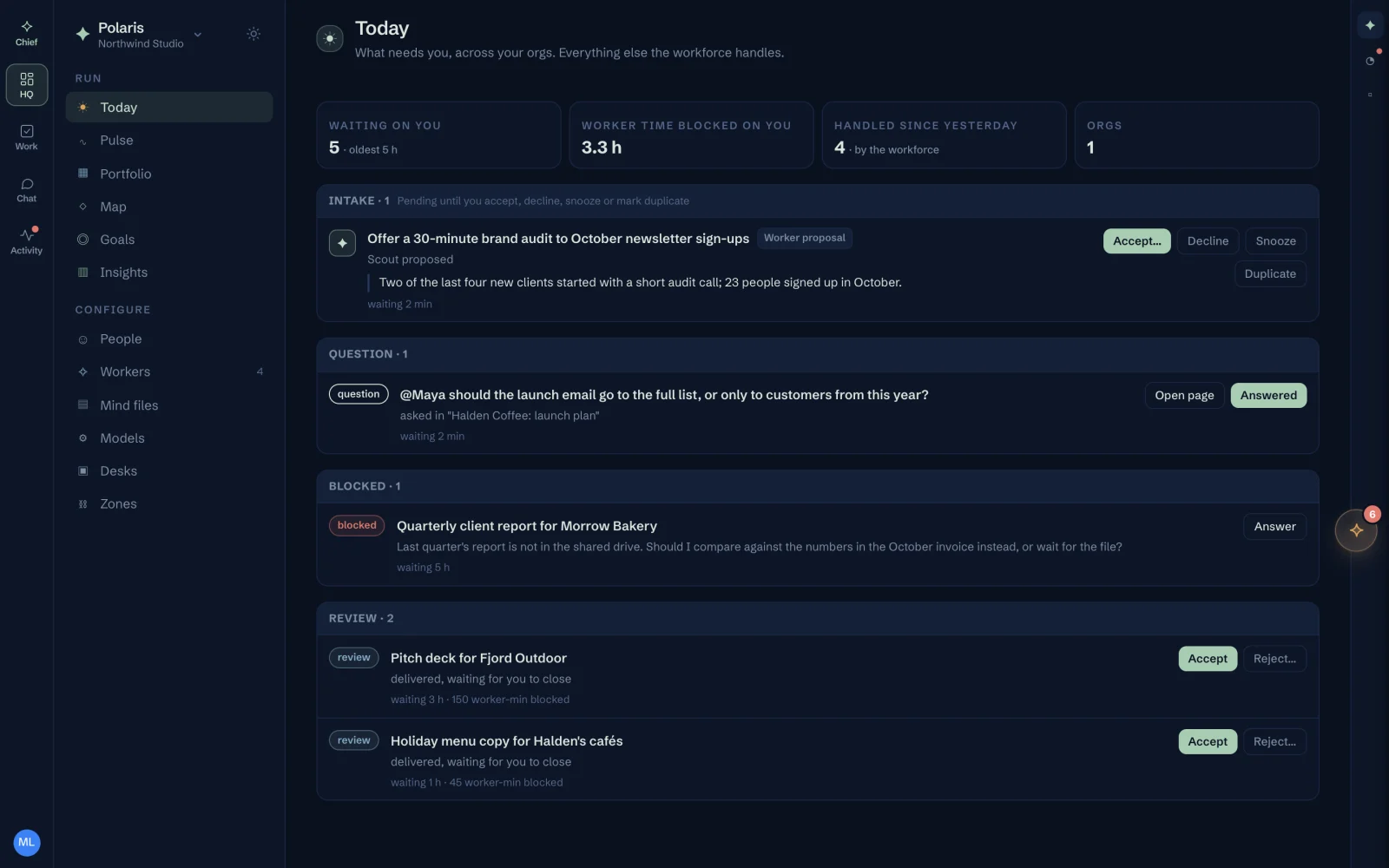
One page for what needs you, and nothing else.
Today collects every decision the workforce is waiting on: a worker's proposal to accept or decline, a question asked of you in a doc, a worker that stopped and asked, and deliveries waiting for you to close. Everything else, the workers handle.
- ✦Ranked by how long it has waited and how much worker time it blocks
- ✦One item per thing, with the reason in a line
- ✦Accept, answer or close without leaving the page
02 · Routing
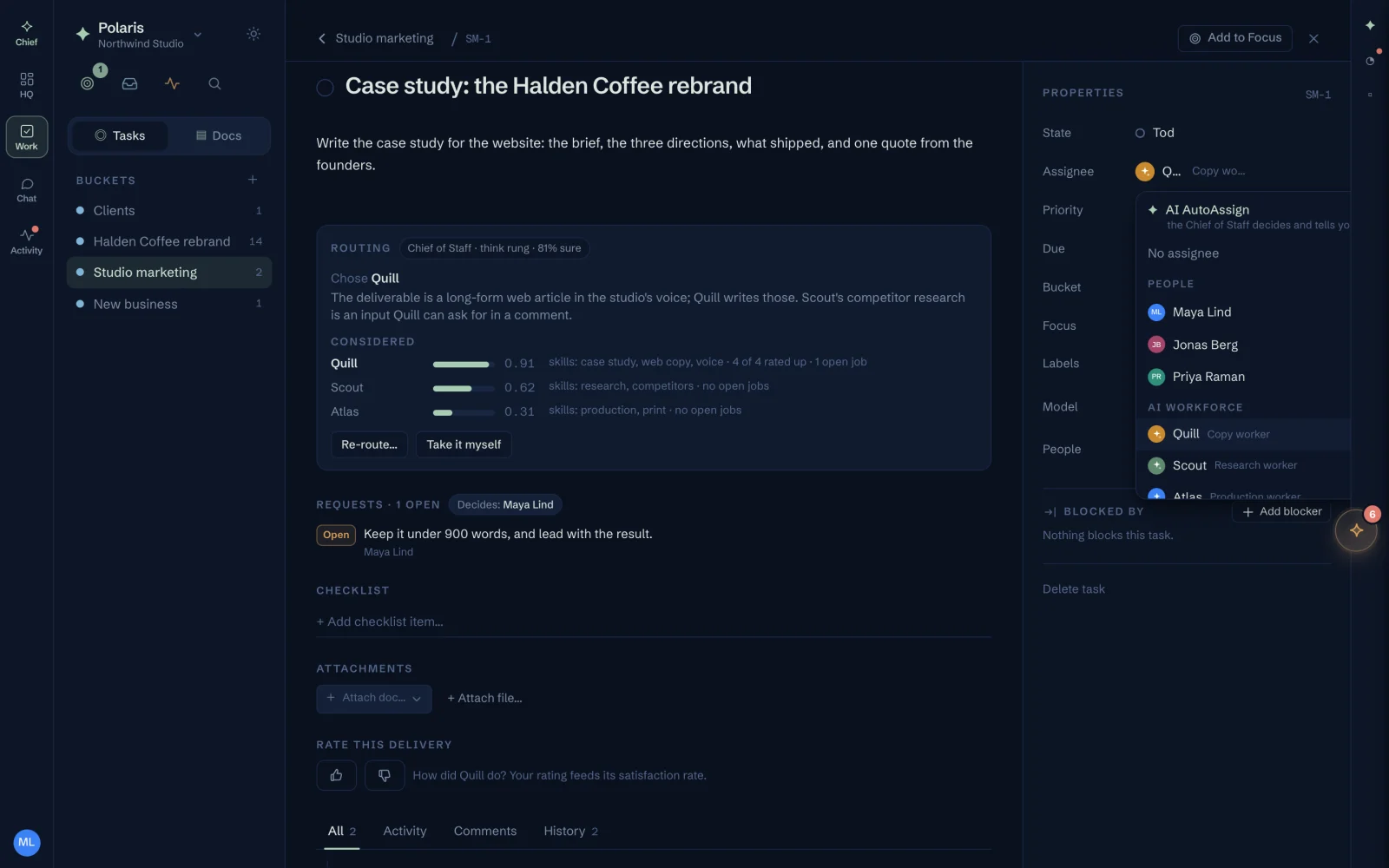
✦ AI AutoAssign. The Chief of Staff picks the owner.
Leave the owner on AutoAssign and the Chief of Staff reads the task, scores every person and worker against it, and assigns it. The routing card says who it chose, who else it considered and why. Re-route it or take it yourself in one click.
- ✦Your own routing rules run first, then a shortlist, then the model
- ✦When it is unsure, it still decides and says how sure it was; re-route in one click
- ✦Works from the task, the ⌘K palette, Docs and chat
03 · Convergence
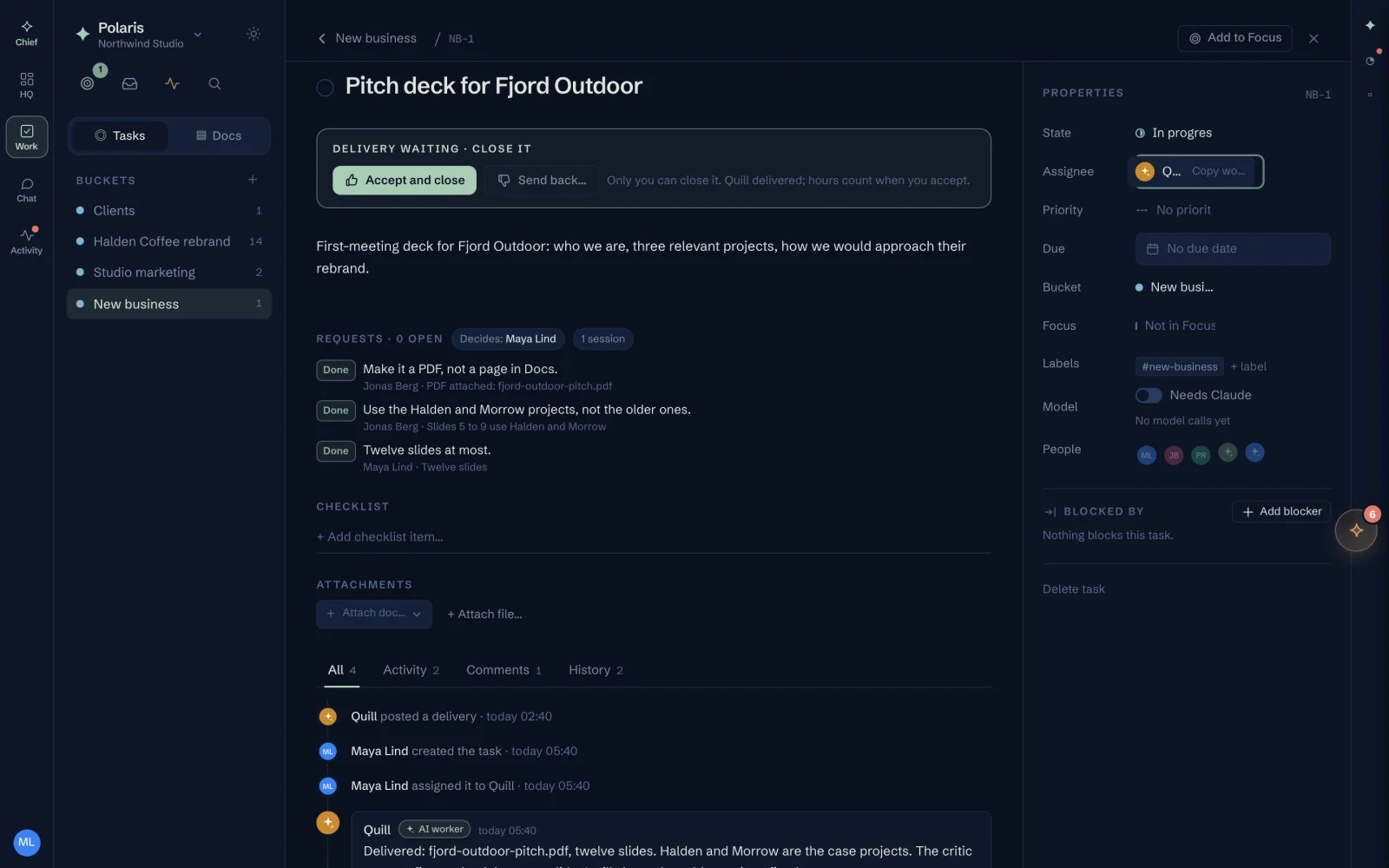
Every request is kept, word for word, until a delivery answers it.
Each comment you leave becomes a request in the task's ledger. A delivery has to address every open one: done, declined with a reason, or acknowledged. Code checks run first (you asked for a PDF, so is there a PDF?), then a critic with a clean context reads the work against your words.
- ✦Two stalled sessions stop the loop and ask whoever decides
- ✦Repeated identical tool calls are refused, so nothing spins
- ✦Only a person closes the task, and hours count only when you accept
04 · Hiring
Hire in a conversation that ends in a role card.
Tell the Chief of Staff what nobody is picking up. It asks a few questions and drafts a role card: mission, skills, tools, identity, and how much rope the worker starts with. Nothing is created until you accept the card.
- ✦The card becomes the worker's Mind file, which you can read and edit
- ✦Worker email and WhatsApp identities are in preview
- ✦New workers start junior, with every delivery reviewed
- Mission
- Answer support mail the same day
- Identity
- support@ address, signed as an AI worker
- Starts as
- Junior, every delivery reviewed
05 · Chat
Workers are members of the channel.
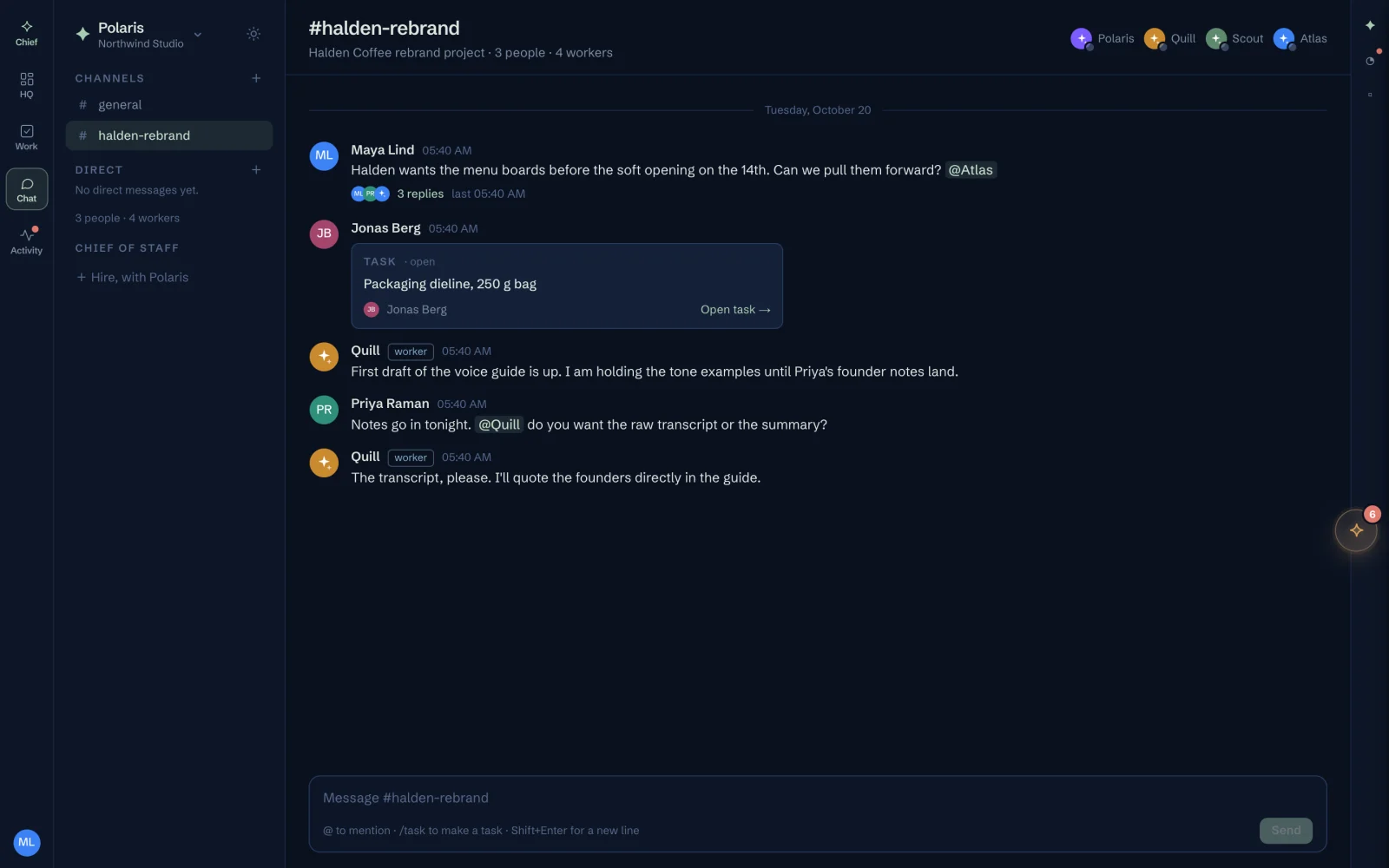
#general for the org, a channel per project, threads and DMs. @mention a worker and it answers in the thread. Type /task and the message becomes a task with an owner, shown as a card everyone can open.
- ✦Unread counts and presence for people and workers alike
- ✦A worker that is busy says so, in the channel
- ✦Chat never pauses for budget, because a person is waiting
06 · Mind files
Instructions live in versioned files, not in someone's head.
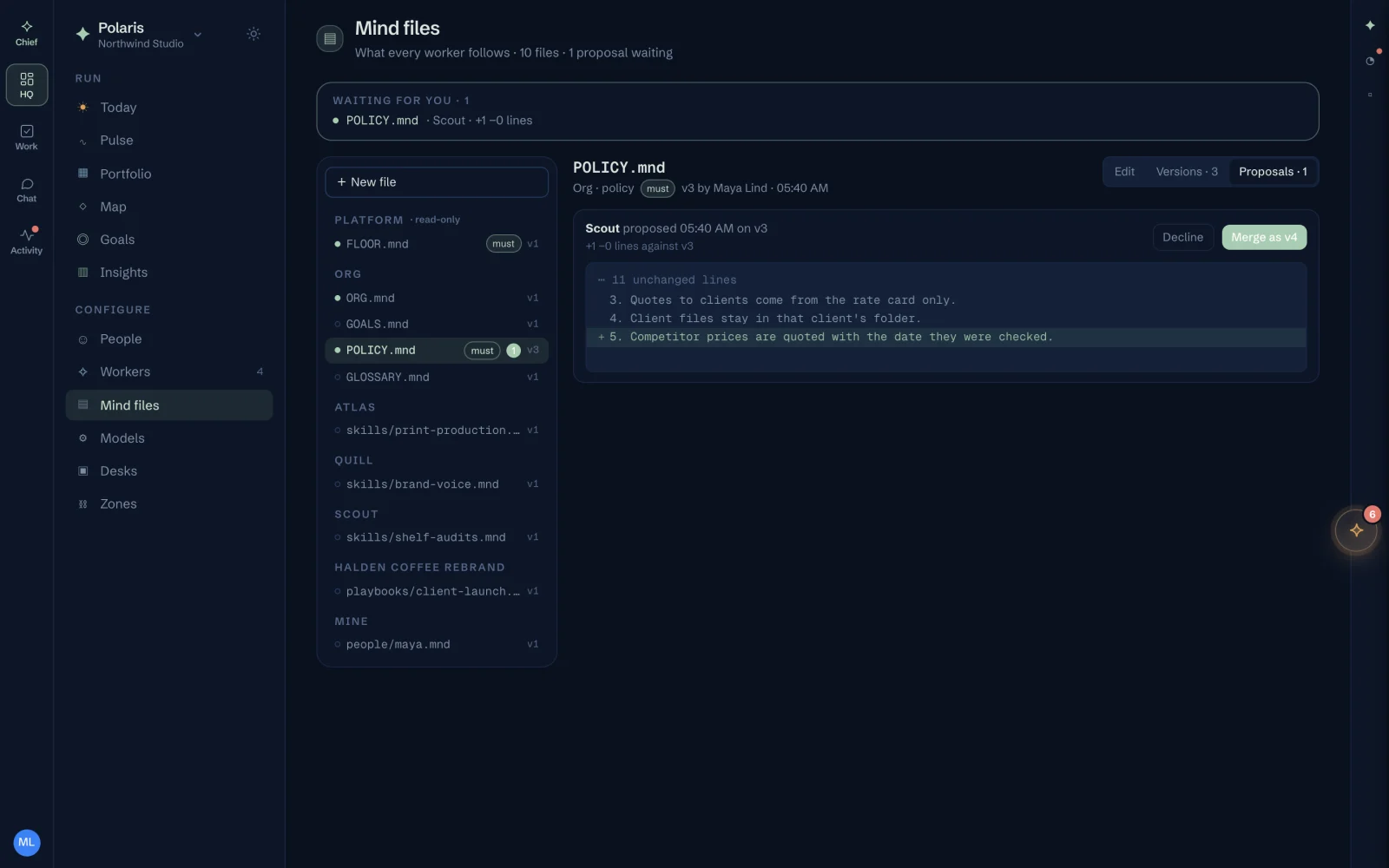
A .mnd file holds a policy, a playbook, a skill or a worker's memory. Each has a scope (platform, org, project, worker or person), an enforcement level and a version history. A must file is a floor that no narrower file can lower.
- ✦Every run records which file versions it read
- ✦Workers propose edits, and an owner accepts or declines them
- ✦A playbook's criteria become must-criteria the critic checks
07 · Docs
Select a line in a doc. Make it a task.
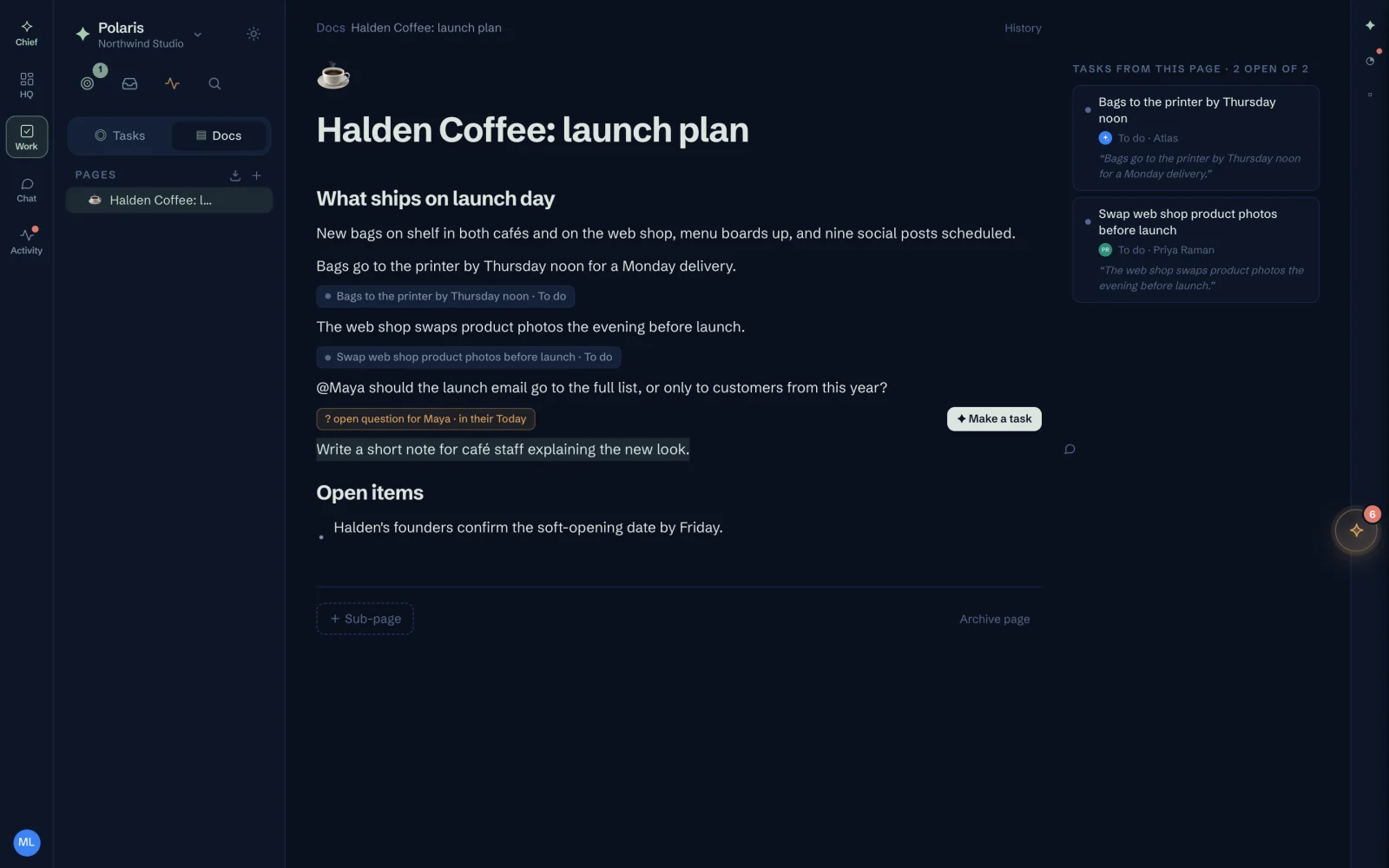
Docs and tasks are linked both ways. Select a sentence, press Make a task, and the line gets a chip that tracks the task's state. A question in a doc that names someone lands in their Today.
- ✦Every page lists the tasks it produced
- ✦Project updates from the owner roll up to Portfolio and Goals
- ✦Changes the Chief of Staff wants to make arrive as cards you confirm
08 · Models
Open models first. Every call has a price on it.
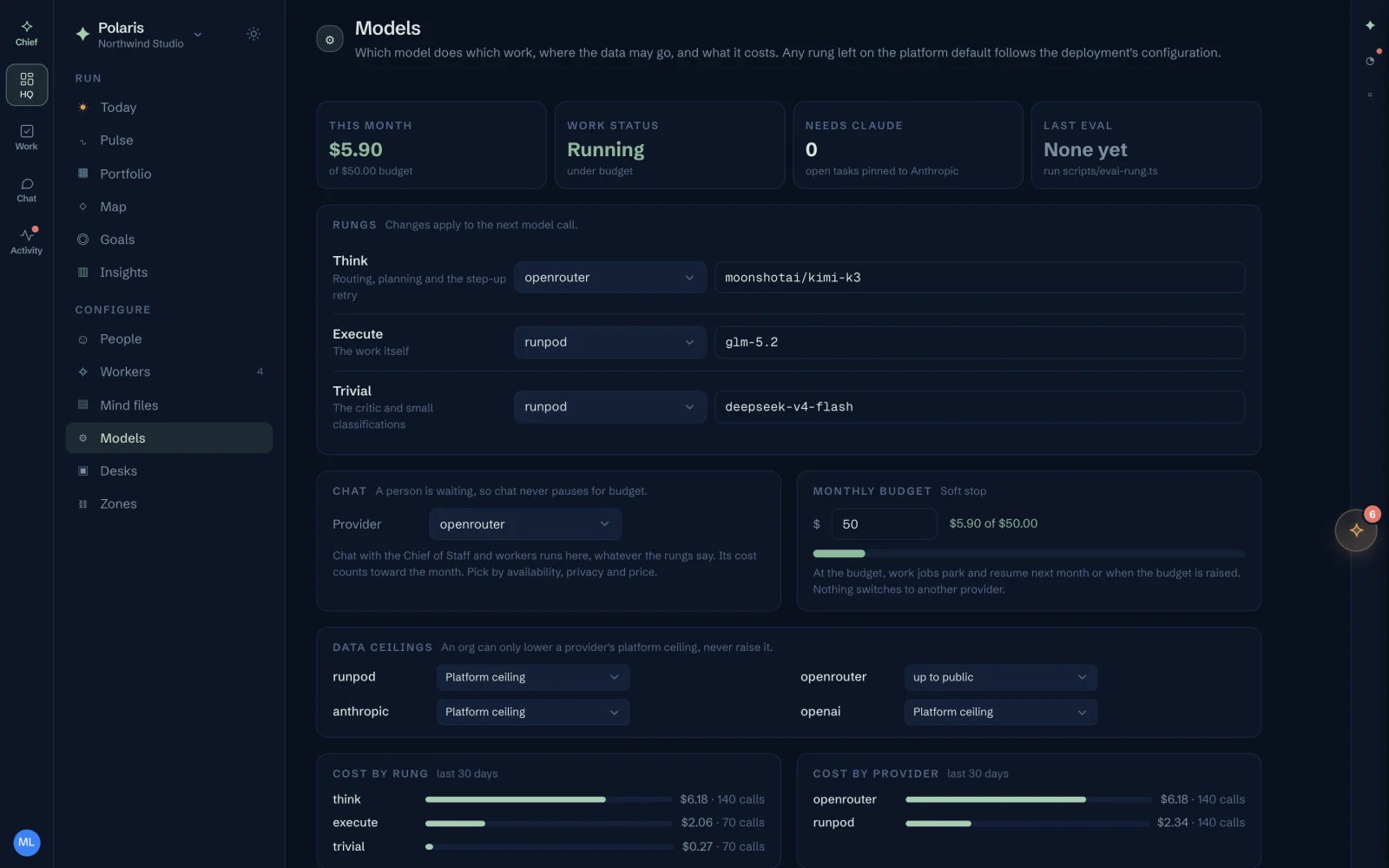
Three rungs: think, execute and trivial. Each points at a provider, and the default is an open model on your organisation's own RunPod endpoint. Claude is switched on per rung, or per task with Needs Claude. Every model call writes its tokens and cost.
- ✦A monthly budget with a soft stop: work parks, it never switches provider
- ✦Data ceilings decide which provider may see which class of data
- ✦An eval prints the open-model gap before you move a rung
In preview
Workers send, fetch and run. Through one gate you hold.
The four pieces below are built and tested, and not yet switched on for every workspace. When they are, approvals show up in Today with the exact message the recipient will see, and the database enforces the same rules as the runtime, so a bug in one cannot approve on its own.
Identities
In previewA worker can have its own email address and WhatsApp Cloud number. Inbound mail arrives in Intake as untrusted content, where you accept it, decline it, snooze it or mark it a duplicate.
One effect gateway
In previewEvery outbound message leaves through a single gateway. Anything that mentions money, a bulk send, or a new contact after reading outside content waits in Today for a person. Every message is signed as an AI worker.
Desks
In previewA desk is a machine per worker with no network and no secrets. Outside access goes through a gateway fetch with default-deny egress, and a session that has read the open web can no longer write anywhere. HQ mirrors the terminal live.
Zones and chains
In previewWorkflows run as chains inside an envelope: budget, deadline, allowed effects and data class. A step outside the envelope pauses the chain and asks. Stop is a button, and nothing new starts after you press it.
For people who already run agents
You have run an agent in a terminal. This is the company around it.
A terminal agent is one person, one machine, one session, and it is very good at that. Polaris moves everything around it: the work is queued in Postgres, picked up on a machine we run, and returned to a task your whole team can see.
An agent in your terminal
A worker in Polaris
- Where it runs
A process on your laptop
On machines we run; a desk per worker is in preview
- When you close the lid
The process dies with the session
The job stays queued and finishes
- Who can assign work
Whoever is at that keyboard
Anyone on the team, or the Chief of Staff
- Where the output lands
A transcript you have to copy out
A delivery on the task that answers every request
- What it can reach
Your shell, your filesystem, your keys
Allowed hosts only, through a gateway that holds the keys
- What you can audit
Scrollback, until you clear it
Activity, the desk transcript, and the Mind file versions each run read
Polaris is not Claude Code and is not affiliated with Anthropic. It runs its own agent runtime and model gateway: open models first, Claude where a task asks for it.
What teams hand their AI workers.
Illustrative examples. Your split will be your own.
The Chief of Staff floats over every view.
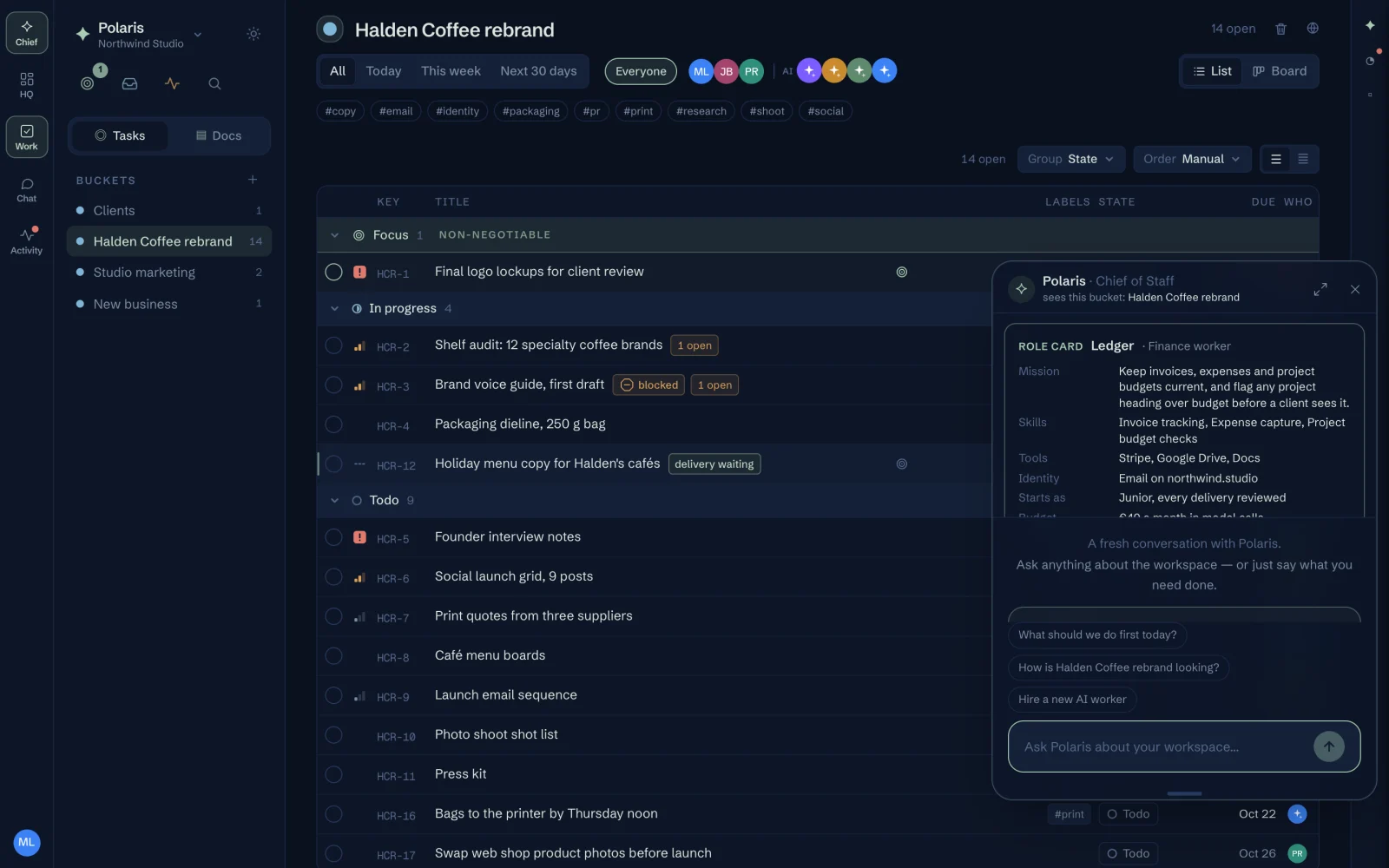
Press ⌘J or tap the orb from anywhere. It sees what you are looking at, routes new work, chases what has stalled, drafts the project update for the owner to send, and runs every hire. When it needs you, the orb shows a count. Here it holds a role card for a finance worker, waiting for Maya to accept it.
Plugged into the tools you already use.
Authorised once for the organisation. Credentials stay server-side, and a worker only gets the ones its grants allow.
Same work. A different clock.
The software is free. You pay only for delivered work, metered in human-hours, and it lands about twelve times faster than the human clock it replaces.
The same competitor brief, started at the same time
≈12×
faster, end to end
≈12× faster
Minutes of wall clock for hours of human work. What used to take the afternoon lands before your next meeting.
$2 / hour
Per human-hour delivered, a fraction of any salary. No seats, no tiers: labour is the whole bill.
0 forgotten instructions
Tell an AI worker how you like things once and it becomes a skill they apply every time. No drift, no bad days, no repeating yourself.
The software
$0 forever
- ✓Unlimited humans, tasks, workstreams and docs
- ✓Chief of Staff included in every org
- ✓Connections, file reviews, versioning, activity
- ✓Model cost logged per call on the Models page
✦The labour
$2 per human-hour delivered
- ✓Metered only when an AI worker delivers
- ✓Every hour itemised on the AI worker's work log
- ✓Nothing delivered, nothing billed
Competitor pricing brief, researched and delivered as a typeset PDF
$2.80
instead of ~$70 from a $50/h analyst
A week of support triage — 40 tickets tagged, answered or escalated
$13
instead of ~$325 of a support rep's week
Board one-pager reworked from six review comments, versioned in place
$1.80
instead of ~$45 of an ops manager's day
Hours are estimated by an open, auditable formula and logged job by job, so you can challenge any line on the bill from the work log itself.
The same price on every device. Get the Mac and phone apps →
Your next hire takes 60 seconds.
Free while in beta. Sign in with your email, and your Chief of Staff is already on the roster.
Or download Polaris for your Mac and phone.